> ## Documentation Index
> Fetch the complete documentation index at: https://docs.deductive.ai/llms.txt
> Use this file to discover all available pages before exploring further.
# Connect the Jira App
> Install the Deductive Jira app and link your Jira site to your organization. One-time, ~5 minutes. Enables Jira-powered automations. You need to be a Jira admin.
The Deductive Jira app links your Jira site to your Deductive organization so your team can build **automations** that use Jira. Once the site is linked, automations can act on your Jira data without anyone re-authenticating.
Linking is a one-time, admin-level task. You need to be a Jira admin to install the app and enter the linking code.
This is separate from the [Jira data source integration](/integrations/jira), which connects Jira as read-only data via an API token. Install the Jira app here when you want to use Jira in automations; use the data source integration when you only want Deductive to reason over Jira data.
## Before you start
* You must be a **Jira admin** on the site you want to link.
* Have your Deductive site open. The setup dialog shows the exact site URL and generates the linking code you'll paste into Jira.
## Step 1: Open Jira setup in Deductive
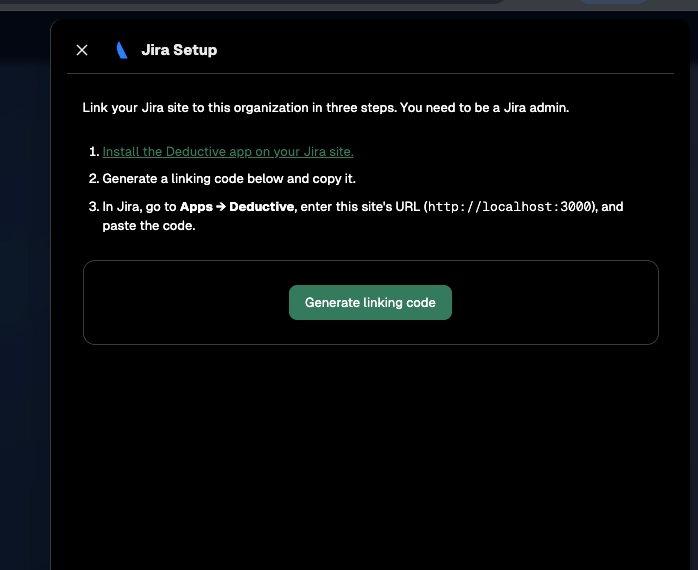
In Deductive, open **Integrations** and select **Jira**. The **Jira Setup** dialog walks you through linking in three steps.
 ## Step 2: Install the Deductive app on your Jira site
In the setup dialog, click **Install the Deductive app on your Jira site**. Follow the prompts in Jira to install the app. You'll need Jira admin permissions to complete the install.
## Step 3: Generate a linking code
Back in the Deductive setup dialog, click **Generate linking code** and copy the code. Keep the dialog open. You'll also need the **site URL** shown in step 3 of the dialog.
## Step 4: Enter the code in Jira
1. In Jira, go to **Apps → Deductive**.
2. Enter the **site URL** shown in the Deductive setup dialog.
3. Paste the **linking code** you copied.
4. Confirm.
Once Jira accepts the code, your site is linked to your Deductive organization.
## What just happened
Your Jira site is now linked to your Deductive organization. Automations that use Jira can run against this site without per-user authentication. Building automations is user-track work.
## Step 2: Install the Deductive app on your Jira site
In the setup dialog, click **Install the Deductive app on your Jira site**. Follow the prompts in Jira to install the app. You'll need Jira admin permissions to complete the install.
## Step 3: Generate a linking code
Back in the Deductive setup dialog, click **Generate linking code** and copy the code. Keep the dialog open. You'll also need the **site URL** shown in step 3 of the dialog.
## Step 4: Enter the code in Jira
1. In Jira, go to **Apps → Deductive**.
2. Enter the **site URL** shown in the Deductive setup dialog.
3. Paste the **linking code** you copied.
4. Confirm.
Once Jira accepts the code, your site is linked to your Deductive organization.
## What just happened
Your Jira site is now linked to your Deductive organization. Automations that use Jira can run against this site without per-user authentication. Building automations is user-track work.