> ## Documentation Index
> Fetch the complete documentation index at: https://docs.deductive.ai/llms.txt
> Use this file to discover all available pages before exploring further.
# Investigate Jira issues automatically
> Create a Jira automation that starts a Deductive investigation and posts the results back to the issue.
Use a Jira automation to start an investigation whenever a matching issue is created or updated. Deductive acknowledges the issue immediately, investigates it using your connected stack, and updates the Jira comment with its findings.
Any member of your Deductive team can create an automation.
A Jira admin must first [connect the Deductive Jira app](/admins/jira). This app works through automations only. To give Deductive read-only access to Jira as a data source, use the separate [Jira integration](/integrations/jira).
## Step 1: Open Automations
Open your Deductive workspace and select **Automations** in the sidebar. You can also add `/automations` to the end of your workspace URL.
Click **New** to create an automation.
## Step 2: Configure the Jira trigger
Give the automation a descriptive name, such as **Jira bugs**, then add the **Jira issue created or updated** trigger.
You can filter Jira issues using:
* **Project key**
* **Issue type**
* **Summary**
For example, select project key `KAN` and issue type **Bug** to investigate bugs in that project. Leave a filter set to **Any** when you do not want to restrict it.
The **updated** event lets the automation work with issues that existed before the automation was created. The first time an issue matches—whether it was created or updated—Deductive associates it with one investigation thread in that automation. Later updates never create a duplicate thread for the same issue.
## Step 3: Add investigation instructions
In **Instructions**, describe what Deductive should do. A short instruction is enough:
> Investigate this bug.
You can add more context when you want the investigation to focus on a particular service, environment, or type of evidence.
## Step 4: Set the daily limit
Set the **Daily trigger limit** to control how many times the automation can run each day. The recommended range is **15–20 runs per day**.
When the limit is reached, additional matching events do not start runs until the daily limit resets.
## Step 5: Review the Jira action
The automation uses **Comment on the triggering Jira issue**. Deductive posts an initial comment when it begins investigating, then updates that same comment when the run completes.
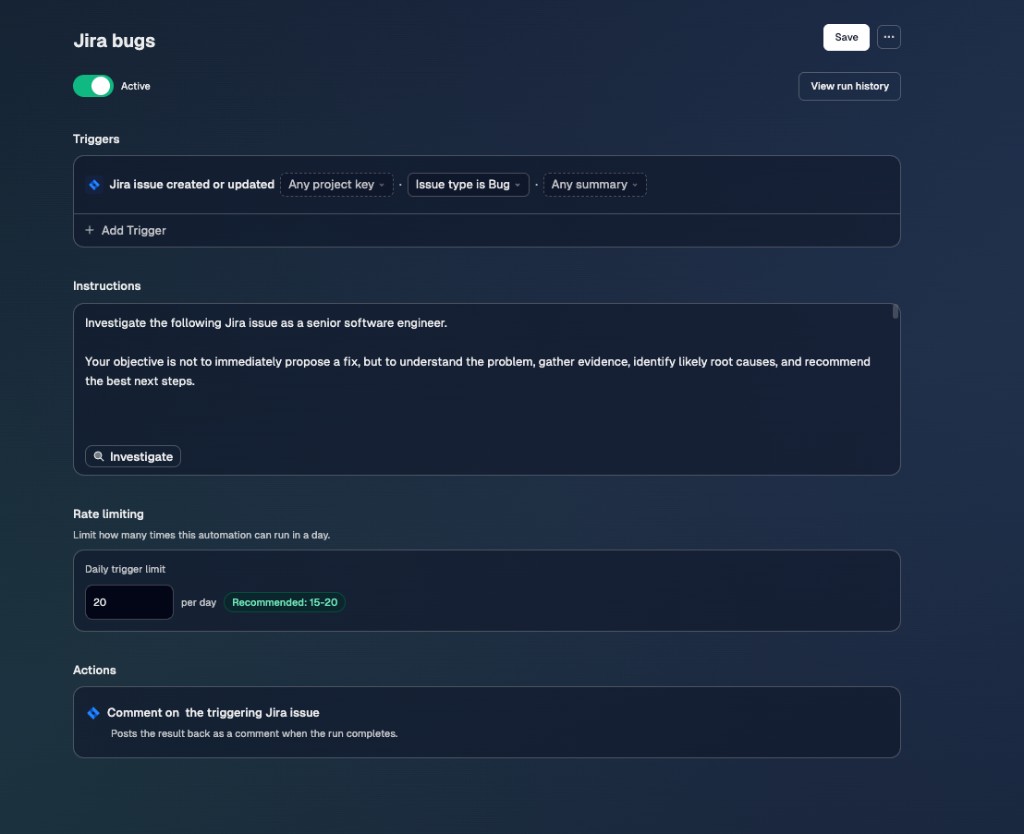 Click **Save** and make sure the automation is **Active**.
## Step 6: Test the automation
Create a Jira issue that matches the trigger, or update an existing matching issue.
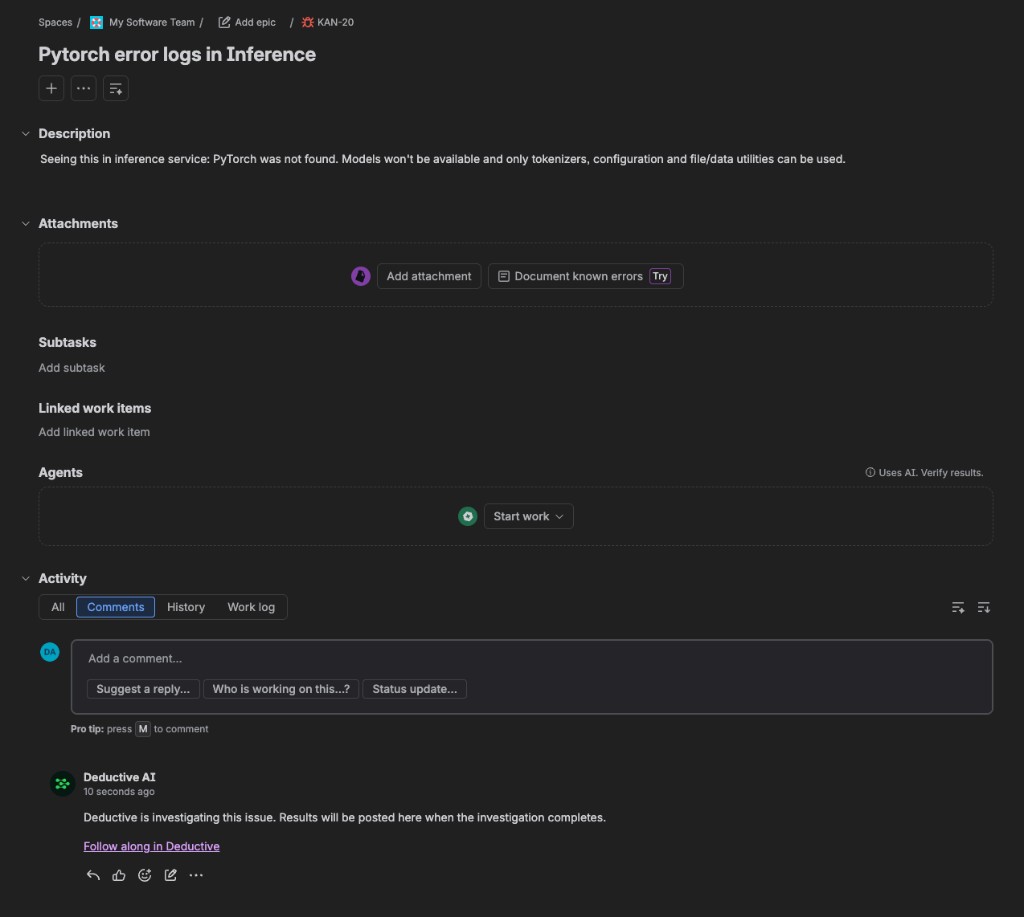
Deductive first posts a comment confirming that it is investigating the issue. Select **Follow along in Deductive** to open the active investigation.
Click **Save** and make sure the automation is **Active**.
## Step 6: Test the automation
Create a Jira issue that matches the trigger, or update an existing matching issue.
Deductive first posts a comment confirming that it is investigating the issue. Select **Follow along in Deductive** to open the active investigation.
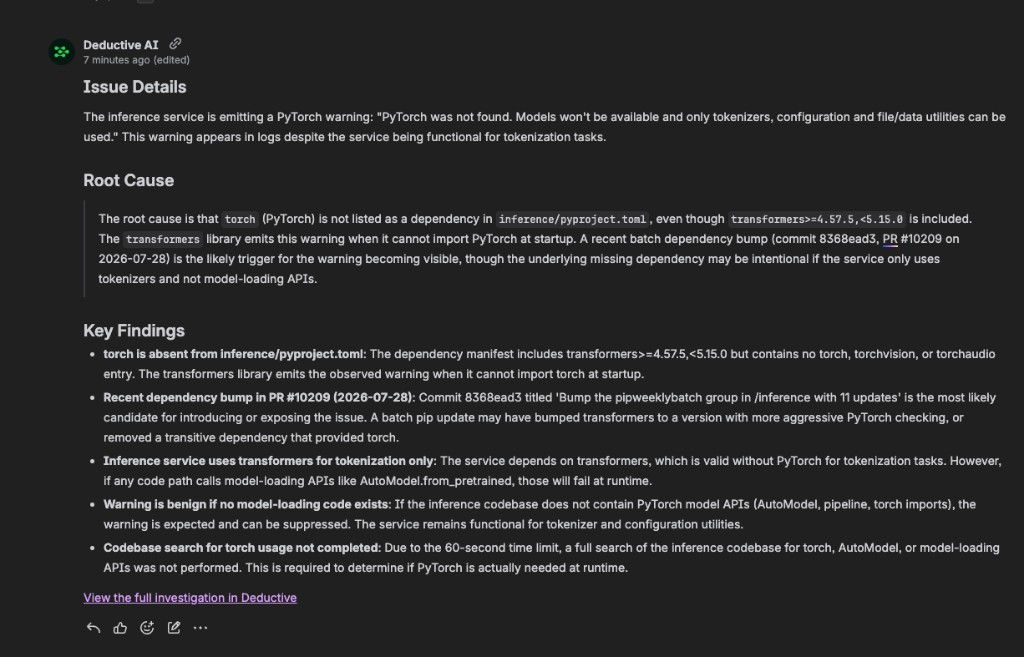
 When the investigation finishes, Deductive updates the same comment with:
* Issue details
* The likely root cause
* Key findings and supporting evidence
* A link to the full investigation in Deductive
When the investigation finishes, Deductive updates the same comment with:
* Issue details
* The likely root cause
* Key findings and supporting evidence
* A link to the full investigation in Deductive
 ## What just happened
The Jira issue now has a persistent Deductive investigation associated with it. Future matching updates remain associated with the same thread, while the Jira comment serves as the shared summary for everyone following the issue.
## What just happened
The Jira issue now has a persistent Deductive investigation associated with it. Future matching updates remain associated with the same thread, while the Jira comment serves as the shared summary for everyone following the issue.