

Part 1. The knowledge graph
Open Agent → Knowledge in the left nav (or/knowledge). The Knowledge Archive is the index Deductive consults to ground every investigation, before it even forms a hypothesis.
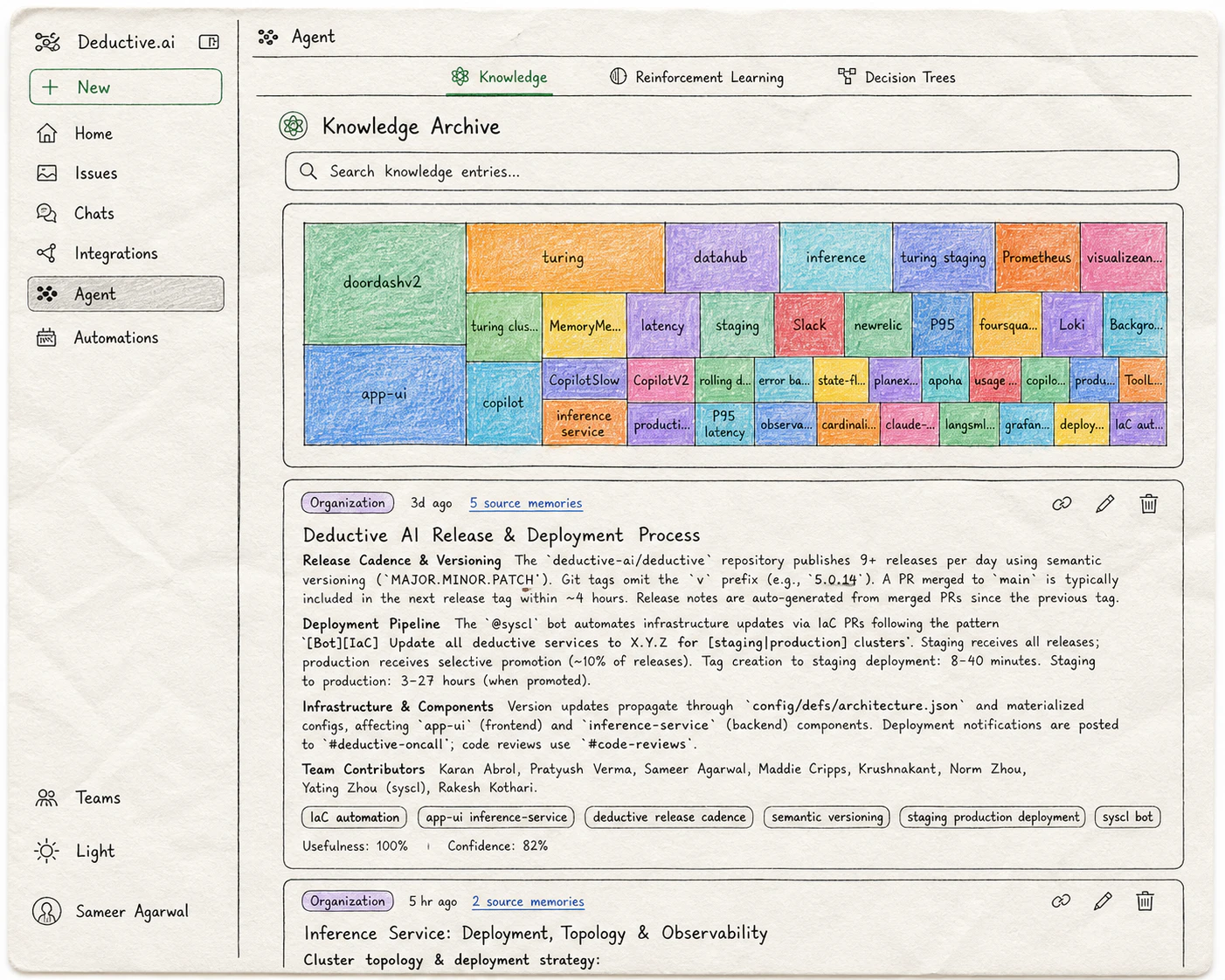
The Knowledge Archive: a keyword-weighted treemap of your team's services and concepts, with curated entries below. Each entry has usefulness and confidence scores and links to the source memories it was built from.
Knowledge entries
Short, curated pieces of context Deductive consults during investigations. Each entry has a title, a body, source memories it was built from, and a usefulness + confidence score. Examples of the kind of context an entry captures:- “
payments-apiis owned by Team Atlas. Page Atlas via#oncall-atlasfor prod issues.” - “Anything in the
legacy-namespace is being deprecated; don’t propose changes there.” - “When
redis_evictionsspikes, look atcache-warmerdeploy timing. They’re correlated 80% of the time.” - “Our staging cluster routinely has
error.rate=0.02baseline; ignore unless it crosses 0.05.”
The keyword graph
Beyond explicit entries, Deductive maintains a keyword-ranked graph across everything you’ve connected. Repos, dashboards, incidents, PRs. The treemap at the top of the Knowledge Archive visualizes the relative weight of each keyword across your stack: the bigger the tile, the more central that concept is to your team’s work. This isn’t just decoration. Deductive uses the graph to retrieve context at investigation time: when a question mentionscheckout, the graph surfaces the repos, dashboards, recent incidents, and knowledge entries that historically co-occur with checkout. The denser and better-curated your graph, the sharper investigations get.
Part 2. Decision trees
Once a question is grounded in the knowledge graph, Deductive plans an investigation as a decision tree and executes it. The tree is the audit trail. Open Agent → Decision Trees in the left nav, then pick a monitor or symptom from the dropdown at the top of the page. Each selection loads the trees Deductive has built for that monitor over time.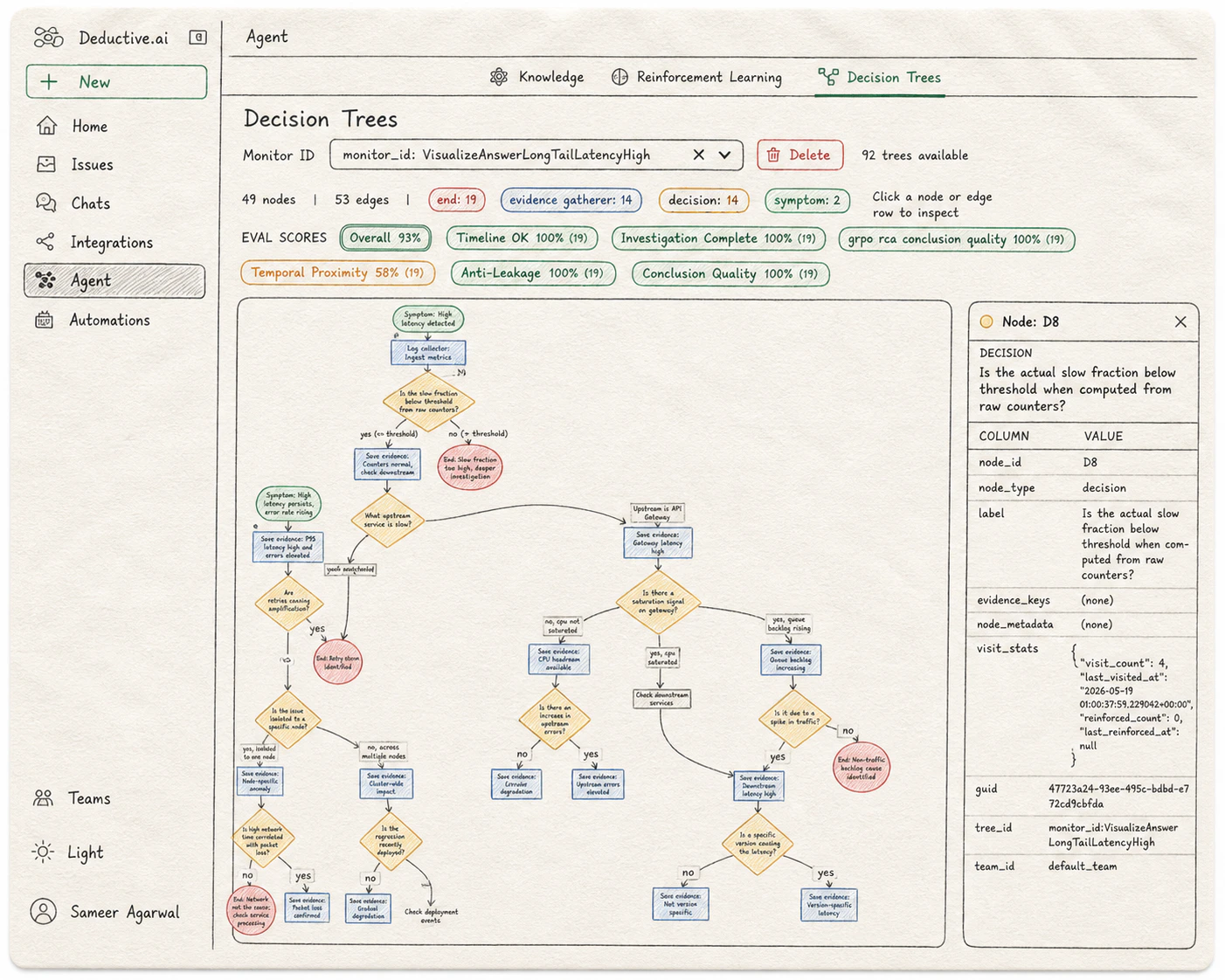
The Decision Trees page: tree-level eval scores across the top, the full reasoning graph in the middle, and a node-detail panel on the right showing the selected decision's metadata and visit stats.
How to read it
Trees grow top-to-bottom. Each tree investigates a single monitor or symptom from the dropdown above.
Above the tree, a header reports the counts: total nodes, total edges, and a breakdown by type (“end: 19 / evidence gatherer: 14 / decision: 14 / symptom: 2”). Edges carry the routing: a “yes” or “no” out of a decision diamond, or the outcome of an evidence gatherer that informed the next step.
Click into any node
Selecting a node opens a detail panel on the right with the node’s full metadata:node_idandnode_type. The canonical id (e.g.D8) and category (symptom,decision,evidence_gatherer,end).label. The question the node is asking, or the evidence statement it captured.evidence_keysandnode_metadata. Structured pointers to the data the node touched. Empty for purely-routing decision nodes; populated for evidence gatherers.visit_stats. How often this node has been traversed (visit_count), when it was last hit (last_visited_at), how many times it’s been reinforced as part of a canonical path (reinforced_count), and when (last_reinforced_at). This is the surface where reinforcement learning is visible at the node level.guid,tree_id,team_id. References for cross-linking and team scoping.
Eval scores
Above the tree, Deductive shows an eval scores row computed across the trees for the selected monitor. Each axis grades a different property of the reasoning. The number in parentheses is the sample size (how many trees were evaluated):- Overall. The rollup across all axes.
- Timeline OK. Whether the events the tree references actually line up in time.
- Investigation Complete. Whether the tree explored enough branches before terminating.
- Temporal Proximity. Whether the evidence the tree cited was close enough in time to the symptom to be causally plausible.
- Anti-Leakage. Whether the tree avoided using information from after the symptom that wouldn’t have been available at investigation time.
- Conclusion Quality. How sharp and well-supported the terminal conclusions are.
- Domain-specific axes (e.g.
grpo rca conclusion quality). Additional axes the evals team has trained for your stack.
How the graph and the tree work together
The knowledge graph is “what the agent always knows.” The decision tree is “what the agent did this time.” They’re two views of the same loop, and you can shape both.Try this next
Teach Deductive
Turn the eval scores and knowledge entries you just saw into reinforced decision trees the agent reuses.
Wire alerts to auto-investigate
Make Deductive react when an alert fires, so the decision trees you just learned to read get built in real time.